Flex Compact Pro Control Channels
Understanding Flex Compact Pro output modes Flex Compact Pro's output depends on two factors: the configured control mode and the input data sent to the luminaire. Some control modes provide direct a…
Understanding Flex Compact Pro output modes
Flex Compact Pro's output depends on two factors: the configured control mode and the input data sent to the luminaire. Some control modes provide direct access to all five LED channels. Others automate LED combinations to simplify operation.
This means not every photometric measurement is relevant for every control mode. The following sections detail each control mode and identify which photometric measurements apply.
3-channel control mode - Factory default
This mode uses three control channels corresponding to red, green, and blue primaries. The luminaire interprets these inputs to control all five LED channels.
When you send saturated colors, the RGB LEDs respond individually. When you send desaturated colors, the luminaire automatically engages the white channels for improved color rendering. At maximum input, all five LED channels operate together.
This mode uses a standard RGB color space—the format used by most video content and control systems. It maintains compatibility with previous iColor Flex generations, providing the same control interface with enhanced capability.
3-Channel IN / 5-Channel OUT (Optimized white, Factory default)
Control Input | Photometric Measurement |
(255,0,0) | Red only |
(0,255,0) | Green only |
(0,0,255) | Blue only |
(255,255,255) | Full on (all 5 LEDs) |
5-channel control mode - Direct channel control
This mode provides direct control over each of the five LED channels within the luminaire. The five control inputs map directly to the five LED outputs—red, green, blue, warm white, and cool white.
This mode is intended for applications requiring precise control over color rendering and spectral output. All photometric measurements are relevant in this mode except the 3-channel maximum output measurement.
5-Channel IN / OUT
Control Input | Photometric Measurement |
(255,0,0,0,0) | Red only |
(0,255,0,0,0) | Green only |
(0,0,255,0,0) | Blue only |
(255,255,255,0,0) | RGB only |
(0,0,0,255,0) | 2700K only |
(0,0,0,0,255) | 6500K only |
(0,0,0,255,255) | iW |
(255,255,255,255,255) | Full on (direct control) |
2-channel control mode - iW mode
This mode is designed for applications requiring tunable white without color capability. Two control channels adjust the relative output of the warm white and cool white LEDs.
The red, green, and blue LED channels are not used in this mode. Only photometric measurements using the white LED channels are relevant.
2-Channel IN / 2-Channel OUT for iW
Control Input | Photometric Measurement |
(255,0) | 2700K only |
(0,255) | 6500K only |
(255,255) | iW |
Additional Control Modes
Three additional control modes are available for specific applications.
3-Channel IN / OUT for RGB
This RGB only mode disables both white LED channels, operating only the red, green, and blue LEDs. It is intended for matching or extending installations using legacy RGB-only nodes.
Photometric data for this mode corresponds to the RGB channel measurements in the 5-channel direct control mode.
4-channel IN / 5-channel OUT
This RGBW only mode provides four control channels: red, green, blue, and white. The white channel combines both the warm white and cool white LEDs on a single control input.
The white channel output corresponds to the full output in the factory-default 3-channel control mode. The red, green, and blue channels correspond to their individual LED channels. Maximum luminaire output in this mode falls between the 5-channel direct control maximum and the 3-channel factory default maximum.
1-channel IN / N-channel OUT (Intensity mode)
This mode uses one control channel to control all LEDs in the luminaire. The relative ratios of the LED channels are determined by the luminaire's configured startup color.
This mode is intended for applications where only a single color is required from the luminaire. Because any color available in the 5-channel direct control mode can be configured as the startup color, photometric measurements vary by configuration.
Changing Control Modes
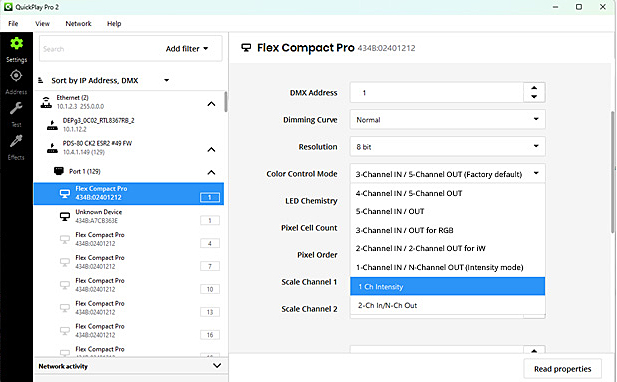
Control modes are configured using QuickPlay Pro 2 (QPP2)—our commissioning software designed for device configuration, DMX address mapping, and live testing. QPP2 connects to your Color Kinetics lighting system through your network, giving you direct access to every luminaire.
Download QPP2 at www.colorkinetics.com/global/support/qpp2
How Did We Do?
Which Flex is right for your installation?
Data Enabler Pro gen3 Status Indicator Functions
