Status indicator lights for PDS-80 CK2 and CM-160 CK2
The PDS-80 CK2 24V and CM-160 CK2 24V each feature eight status indicators that give you an instant read on system performance and make troubleshooting fast and straightforward. Although the two prod…
The PDS-80 CK2 24V and CM-160 CK2 24V each feature eight status indicators that give you an instant read on system performance and make troubleshooting fast and straightforward.
Although the two products differ in form factor and specification, their indicator lights are identical, so this guide applies to both. PDS-80 CK2 form-factor shown.
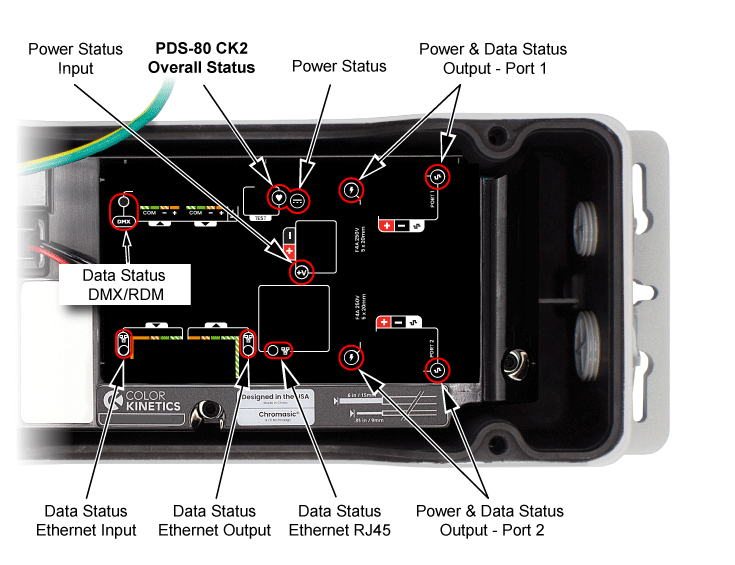
Indicator | Status - color and pattern showing | Description |
 PDS-80 CK2 Overall Status | Blue - slow flashing (3 second period) | PDS Normal operation |
Blue - quick flashing (0.5 second period) | PDS in bootloader mode | |
Blue - solid on | Power present, but firmware not active | |
Repeating color wash with 10 second cycle time | Contractor test mode active; color is indicative of RGB color sent to luminaires | |
 Power Status | Green - solid | Normal operation |
Off | Internal power not present | |
 Power Status Input | Green - solid | Normal operation |
Off | No input power detected | |
 Power Status Output - Port 1 | Blue - solid | Output power enabled |
Off | Output power disabled by user | |
Blue - slow flash | Output power disabled by system | |
Yellow - 2 quick flashes every 2 seconds (Morse "I") | Port 1 output fault | |
Yellow - quick flash | Port 1 fuse failed | |
 Power Status Output - Port 2 | Blue - solid | Output power enabled |
Off | Output power disabled by user | |
Blue - slow flash | Output power disabled by system | |
Yellow - 2 quick flashes every 2 seconds (Morse "I") | Port 2 output fault | |
Yellow - quick flash | Port 2 fuse failed | |
 Data Status Ethernet RJ45 | Green - flashing | Ethernet input port Ethernet link and activity |
Green - solid | Ethernet input Ethernet link / no activity | |
Off | Ethernet input port no link or activity | |
 Data Status Ethernet Input | Green - flashing | Ethernet input port Ethernet link and activity |
Green - solid | Ethernet input Ethernet link / no activity | |
Off | Ethernet input port no link or activity | |
 Data Status Ethernet Output | Green - flashing | Ethernet input port Ethernet link and activity |
Green - solid | Ethernet input Ethernet link / no activity | |
Off | Ethernet input port no link or activity | |
 Data Status Output - Port 1 | Green - Data TX low | Data being transmitted on port 1 data line |
Off | Port 1 output data line idle | |
 Data Status Output - Port 2 | Green - Data TX low | Data being transmitted on port 2 data line |
Off | Port 2 output data line idle | |
 Data Status DMX/RDM | Blue - solid or very rapid flashing | Normal operation of DMX port - Data being received at DMX port |
Green - solid or very rapid flashing | Data being output from DMX port | |
Off | No data being sent or received at DMX port | |
bluish-green solid or very rapid alternating or flashing | Mix of data transmit and receive on DMX port |
To learn more about Color Kinetics PDS-80 CK2 24V, or the CM-160 CK2 24V for Flex Compact Pro luminaires visit the product pages at https://www.colorkinetics.com/global/products/pds/pds80-ck2.
https://www.colorkinetics.com/global/products/pds/cm160-ck2.
How Did We Do?
Data Enabler Pro gen3 Status Indicator Functions
The Trouble With Lumens
